v4.5.0-rc1
Omarchy 4.5 Release Candidate
⚠️ This is a release candidate, not a final release. Expect bugs, rough edges, and the occasional thing that breaks outright. Run it on a test machine, or make sure you have a working backup (or a snapshot you know how to roll back to) before you upgrade a machine you depend on.
Omarchy 4.5 is the first feature release since Quattro. It speaks 50 languages, gives every monitor its own workspaces, adds floating workspaces with a dock, rebuilds notifications, gathers how the desktop looks into a new Appearance menu, plays theme intros, and ships four new default apps: Hype, Monologue, Signed, and Disktree. Underneath, it’s faster from boot to theme switching, and it runs on NVIDIA N1x and Snapdragon X laptops.
Try it on an existing machine with Update > Channel > RC, then Update > Omarchy. Please report anything that breaks on GitHub.
Install on new machines with the ISO:
x86_64:
- Download: https://iso.omarchy.org/omarchy-4.5.0rc1.iso
- SHA256: fd8e39f6eca395315328dd12208cc0c324aaf067dc391aa2b476c166ed0f8718
aarch64:
- Download: https://iso.omarchy.org/omarchy-4.5.0rc1-aarch64.iso
- SHA256: c5ef83d04cad34deb074583b53b3cce9c5c42e8f18e0f6ab78313e30916adb28
Headline Features
- Translate Omarchy into 50 languages, switched live from
Setup > Language. - Give each monitor its own workspaces, remembered every time it’s plugged back in.
- Add floating workspaces with themed titlebars and a dock, alongside dwindle and scrolling on
Super + L. - Rebuild notifications: stacked by sender, snooze, Do Not Disturb, history, and actions, codes, and links right on the card.
- Gather how the desktop looks into a new
Trigger > Appearancemenu. - Play a short intro when a theme loads, and allow video wallpapers on the desktop and lock screen.
- Boot in about a second, quietly.
- Make theme switching, menus, panels, and the bash prompt much faster, and make the desktop react to changes instead of polling.
- Add Hype, Monologue, Signed, and Disktree as default apps, and Elsewhen as a built-in world clock.
- Add a Quake-style scratchpad console on
Super + Grave. - Support NVIDIA N1x and Snapdragon X laptops, and merge Omarchy Mac into Omarchy.
- Add Japanese, Chinese, and Korean input methods from the installer, plus Superwhisper and Voxtype dictation.
- Switch between several Claude and Codex subscriptions, and add Kimi and Ori as coding agents.
- Add Starship as a new default theme.
Performance
- Make theme switching much faster by @dhh in #13403
- Speed up menus, panels, and media keys by @dhh in #13418
- Make the desktop react to changes instead of polling by @dhh in #15026
- Speed up the Omarchy menu by @dhh in #15039
- Log out, reboot, and shut down as soon as apps finish closing by @dhh in #15231
- Get the bash prompt up ~30 ms sooner by @dhh in #13591
- Speed up opening a terminal in the current window’s directory by @dhh in #13423
- Keep the image picker fast and sharp with large collections and HiDPI by @keylimesoda in #14117
- Turn on hardware video decoding in mpv by @dhh in #15172
- Switch TCP congestion control to BBR and use the kyber I/O scheduler on real disks by @dhh in #11658
- Add a no-animations mode, on by default in VMs by @dhh in #13550
Aesthetics
- Add Trigger > Appearance for how the desktop looks by @dhh in #14973
- Add Starship as a default theme by @dhh in #14705
- Add a Flexoki Light intro by @yamz8 in #15315
- Add the Liftoff wallpaper to Tokyo Night by @tcballard in #14755
- Remember the selected wallpaper for each theme by @OldJobobo in #7718
- Allow deleting extra themes from the theme picker by @dhh in #14713
- Make apps opaque by default, keeping terminals transparent by @dhh in #14253
- Normalize bar icon size and alignment by @bjarneo in #15065
- Add a clock format with live seconds by @omarchybot in #7586
- Make VS Code-family editors follow theme changes live by @Macho0x in #10134
- Retheme running Hunk sessions on theme change by @dhh in #13518
- Add theme sync to herdr machines by @dhh in #13430
- Enable overlay scrollbars in Chromium by @robzolkos in #14456
Desktop
- Allow bar widgets to live in the tray’s drawer by @dhh in #15281
- Allow scrolling through workspaces from the bar by @outfoxxed in #15256
- Improve dragging and arranging bar widgets by @outfoxxed in #15517
- Add a hover close button to notification toasts by @dhh in #6946
- Allow muting a program’s notifications from its crash diagnosis by @omarchybot in #8549
- Show captive portal status and a sign-in action in the network panel by @tobi in #8859
- Take a screenshot with Super + Shift + S by @TripleU613 in #8827
- Add Super + Q as a second chord for closing a window by @omarchybot in #7767
- Add Super + Ctrl + Alt + F to toggle a full-screen desktop by @dhh in #10672
- Add select all and standard clipboard shortcuts in terminals by @ryanrhughes in #12915
- Add o.rebind for replacing Hyprland keybindings by @ryanrhughes in #10537
- Dim installed software in the Install menus instead of hiding it by @dhh in #6955
- Install missing apps when choosing defaults by @dhh in #6950
New Apps & Defaults
- Install Hype by default by @dhh in #13455
- Add Monologue as a default app by @dhh in #13449
- Replace Xournal++ with Signed for signing PDFs by @dhh in #14999
- Replace the Disk Usage TUI with Disktree by @dhh in #14426
- Replace Tensaku with Omasnap for screenshots by @ryanrhughes in #9446
- Add gliff for remote desktop over SSH by @dhh in #14712
- Add Microsoft Outlook, Word, Excel, PowerPoint, Teams, and OneDrive web apps by @dhh in #10367
- Add Slack to Install > Service by @dhh in #14434
- Add SSH Agent as an optional service by @carletex in #9399
- Add original vi as a terminal editor choice by @dhh in #10307
- Add hey, basecamp, and Cloudflare CLIs as lazy-installed tools by @monorkin in #7626
- Install T3 Code as its self-updating AppImage by @ryanrhughes in #15907
- Improve PHP and Laravel installation by @nunomaduro in #12141
- Install Node lazily and leave your mise config alone by @ryanrhughes in #15876
- Register password manager and other native messaging hosts for Brave Origin by @dhh in #10292
AI & Agents
- Allow switching between several Claude and Codex subscriptions by @dhh in #13770
- Allow copying agent subscription logins over SSH by @dhh in #15405
- Apply agent account selection to CLI subprocesses by @dhh in #14233
- Add Kimi as a default coding agent, with usage in the agents panel by @sorenmat in #7261
- Add Ori as a default coding agent by @omarchybot in #7709
- Replace the Gemini coding agent with Antigravity by @sanjyay in #6900
- Bring Grok up to par with Claude and Codex in the agents panel by @dhh in #13992
- Show Codex individual spend limits and their reset times by @Stegi56 in #15722
- Add the Claude desktop app to Install > AI by @spencerbull in #10755
- Set up browser integration when choosing Claude by @dhh in #11934
Languages & Input
- Add Japanese, Chinese, and Korean input methods from the installer by @dhh in #14433
- Improve Japanese, Chinese, and Korean setups by @omarchybot in #15508
- Add Superwhisper and Voxtype dictation by @dhh in #14552
- Return Caps Lock to normal and make Shift + Caps Lock the compose key by @dhh in #14939
- Apply the system keyboard layout to the login screen by @g-desoutter in #6896
Hardware
- Set up installed NVIDIA applications by @jdvmi00 in #12723
- Stop asking for a reboot after every update on ARM by @birkskyum in #14447
- Offer Dropbox on ARM machines with 4K pages, and Spotify as a web app on ARM by @birkskyum in #15757
- Hide GeForce NOW, Battle.net, and Lutris installs on ARM by @birkskyum in #15753
- Fix the HP EliteBook Ultra G1q internal microphone by @bprendie in #15574
- Use upstream support for Motorcomm YT6801 Ethernet by @AFOliveira in #9682
- Relay the Elgato Cam Link 4K as a 16:9 virtual camera by @dhh in #10809
- Support fingerprint readers that a platform names by @scottjones in #14675
- Print the OEM Windows product key from firmware by @dhh in #7480
System & Updates
- Ask for the sudo password once per Omarchy update by @dhh in #13323
- Approve orphan package removal automatically during updates by @dhh in #14428
- Keep package updates safe from logging out mid-transaction by @dhh in #11651
- Allow choosing how long passwordless sudo lasts by @dhh in #14435
Removed
- Remove Lazydocker from new installs by @dhh in #14230
- Remove OBS Studio and Kdenlive from new installs by @dhh in #14962
- Install clang with the Rust dev environment instead of for everyone by @dhh in #14967
- Remove the Azerbaijani keyboard choice, which installed French AZERTY by @dhh in #14877
Security
- Keep the Windows VM password out of the RDP client’s arguments by @dicemans in #7902
- Move screen-recording state out of world-writable /tmp by @Chessing234 in #8374
- Harden passwordless sudo expiry across suspend by @AFOliveira in #9457
- Bind update inhibitor cleanup to the process that created it by @AFOliveira in #9467
- Isolate OCaml cleanup authorization by @ErikMelton in #10217
- Pin factory-reset elevation to the packaged command by @AFOliveira in #13047
- Remove saved fingerprint templates for the invoking user on reset by @AFOliveira in #13049
- Refuse hook and state names that are paths by @Adolanium in #8170
- Defer to system-auth in the polkit stack written by fingerprint and FIDO2 setup by @Wheel-Smith in #9873
Fixes
- Fix upgrades that could leave a kernel image without its root= parameter by @dhh in #6951
- Fix fullscreen windows losing fullscreen after the screensaver by @MGross21 in #3284
- Fix DaVinci Resolve dialogs stealing pointer focus by @AksharP5 in #6919
- Fix fingerprint enrollment and lock-screen recovery by @GeertJohan in #7158
- Fix key auto-repeat in the lock screen password field by @berndb in #7806
- Fix 1Password and Bitwarden windows not floating by @dhh in #11704
- Fix the boot password prompt off-center when a display appears late by @dhh in #11641
- Fix the lock screen wallpaper loading after the password field on wake by @dhh in #13431
- Fix the Wi-Fi icon flickering on OWE transition-mode networks by @dhh in #14133
- Fix the cursor disappearing at startup after Hyprland reloads by @spencerbull in #14935
- Fix the fingerprint reader waking while the lock has displays off by @dhh in #15294
- Fix per-monitor workspaces moving after a monitor is unplugged by @ryanrhughes in #15867
- Fix clipboard capture hangs by @maxcroy1 in #9488
- Fix keyring access through the XDG Secret portal by @pkwagner in #9594
- Fix agent panel clicks opening the tray by @dhh in #15501
- Fix factory reset erasing other systems’ boot entries by @omarchybot in #14949
- Fix a blank factory reset prompt when run under sudo by @ryanrhughes in #16032
- Fix updates failing when omarchy-nvim isn’t installed by @imzihuailin in #15141
- Fix calculator shortcuts staying after removing preinstalled apps by @OldJobobo in #7716
- Fix the Copy URL shortcut in Brave Origin profiles by @dhh in #10308
- Fix keyring updates claiming success when key operations fail by @Adolanium in #7807
- Fix blurry menus and pickers on fractionally scaled displays by @dhh in #13419
- Fix menus and pickers not reopening after a monitor is disconnected by @dhh in #14458
- Fix the shell crashing when an audio device disconnects with the audio panel open by @omarchybot in #7783
- Fix volume and output controls in non-English locales by @Sebo1411 in #14855
- Fix screen lock timeouts when the session names a display that’s gone by @dhh in #15226
- Fix Neovim failing to start with the Catppuccin theme by @anandude in #12864
- Fix themes with cyclic color references hanging the theme switch by @AFOliveira in #13046
- Fix 1Password closing when the installer terminal exits by @dhh in #12402
- Fix the keyboard layout widget switching devices nobody types on by @bjarneo in #10670
- Fix ONCE installation when you’re not in the docker group by @kevinmcconnell in #8224
- Fix the desktop showing through Windows VM displays by @jmwall in #8162
Feature presentations
Omarchy in 50 languages
Pick a language under Setup > Language or run omarchy language <code>. The menu, desktop, and Omarchy’s notifications switch immediately, and the system locale follows on next login.
Floating workspaces with a dock
Super + L now cycles a workspace between dwindle tiling, scrolling, and floating, and the bar shows which layout each workspace uses. On a floating workspace every window floats with a titlebar in your theme’s colors, and a dock shows your pinned apps, everything running, and a grid of every app. Drag to reorder or pin, right-click for more, and set the dock’s position and auto-hide under Appearance > Dock. Super + M minimizes a window to the dock.
Workspaces for every monitor
Super + 1-0 now goes to the workspaces of the monitor you’re on, and each monitor’s bar shows only its own. A monitor gets the same workspaces back every time it’s plugged in.
New, enhanced notifications
Notifications now stack by sender, and you can snooze them, turn on Do Not Disturb, and look back through your history. Action buttons, verification codes, and links work right from the card, and cards follow your theme. Identical notifications from the same sender collapse into one. This grew out of the Omapager plugin, which is now built into Omarchy.
The Appearance menu
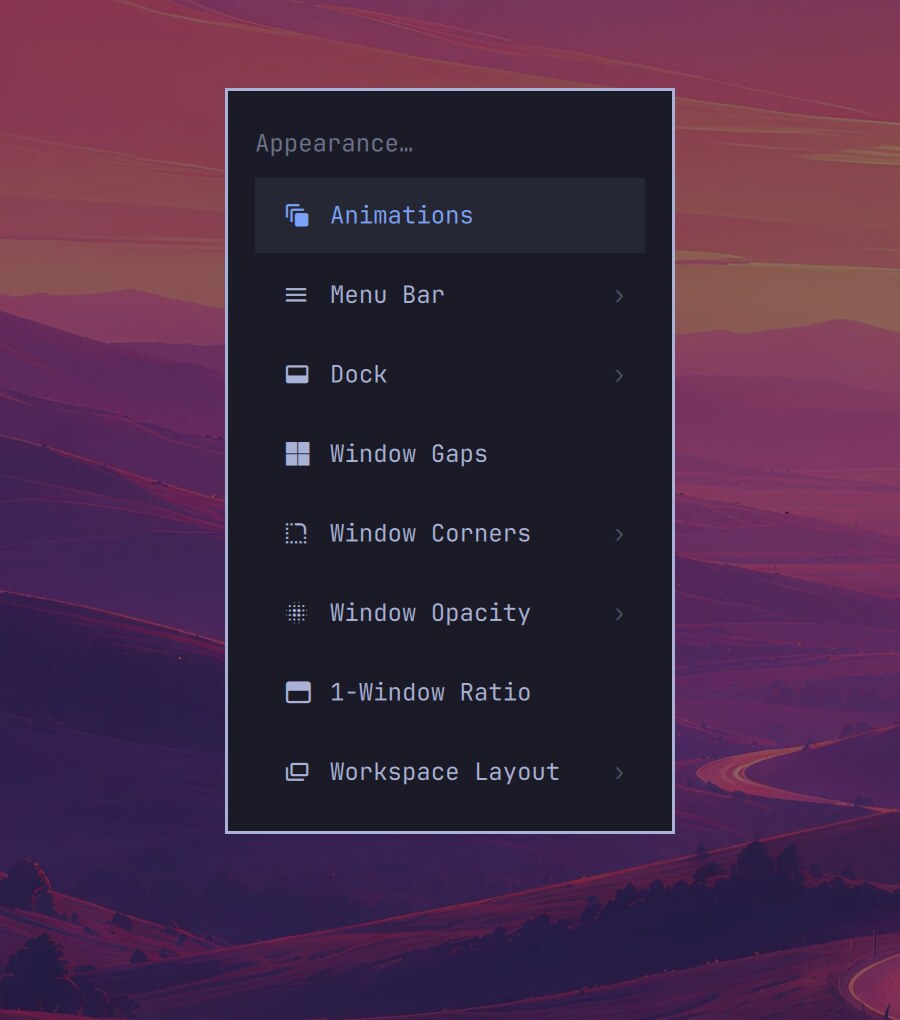
Everything about how the desktop looks now lives in one place under Trigger > Appearance: animations, the menu bar’s background, indicators and clock, the dock, window gaps, corners, and opacity, the one-window ratio, and each workspace’s layout.
Theme intros, video wallpapers, and Starship
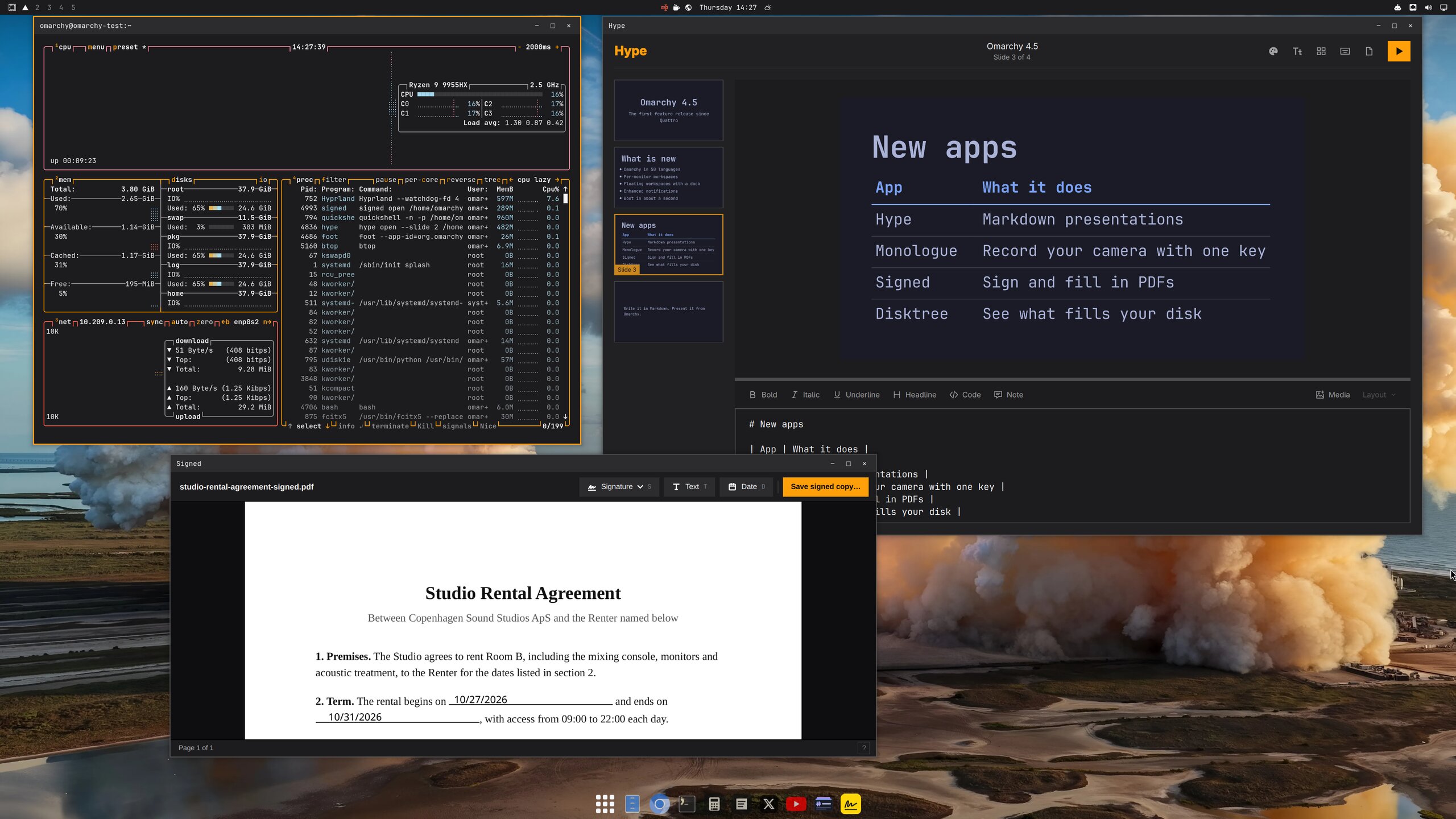
Backgrounds can be videos on the desktop and lock screen, now played by OWE. Themes play a short silent intro at login and when you switch to them; turn intros off under Appearance > Animations. Starship, the new default theme in the screenshot at the top, brings four rocket backgrounds of its own.
Boot in about a second, quietly
Limine’s menu wait drops from about six seconds to one, boot is silent, and binfmt registration no longer stalls startup. Press any key during boot to reach the menu.
The new default apps
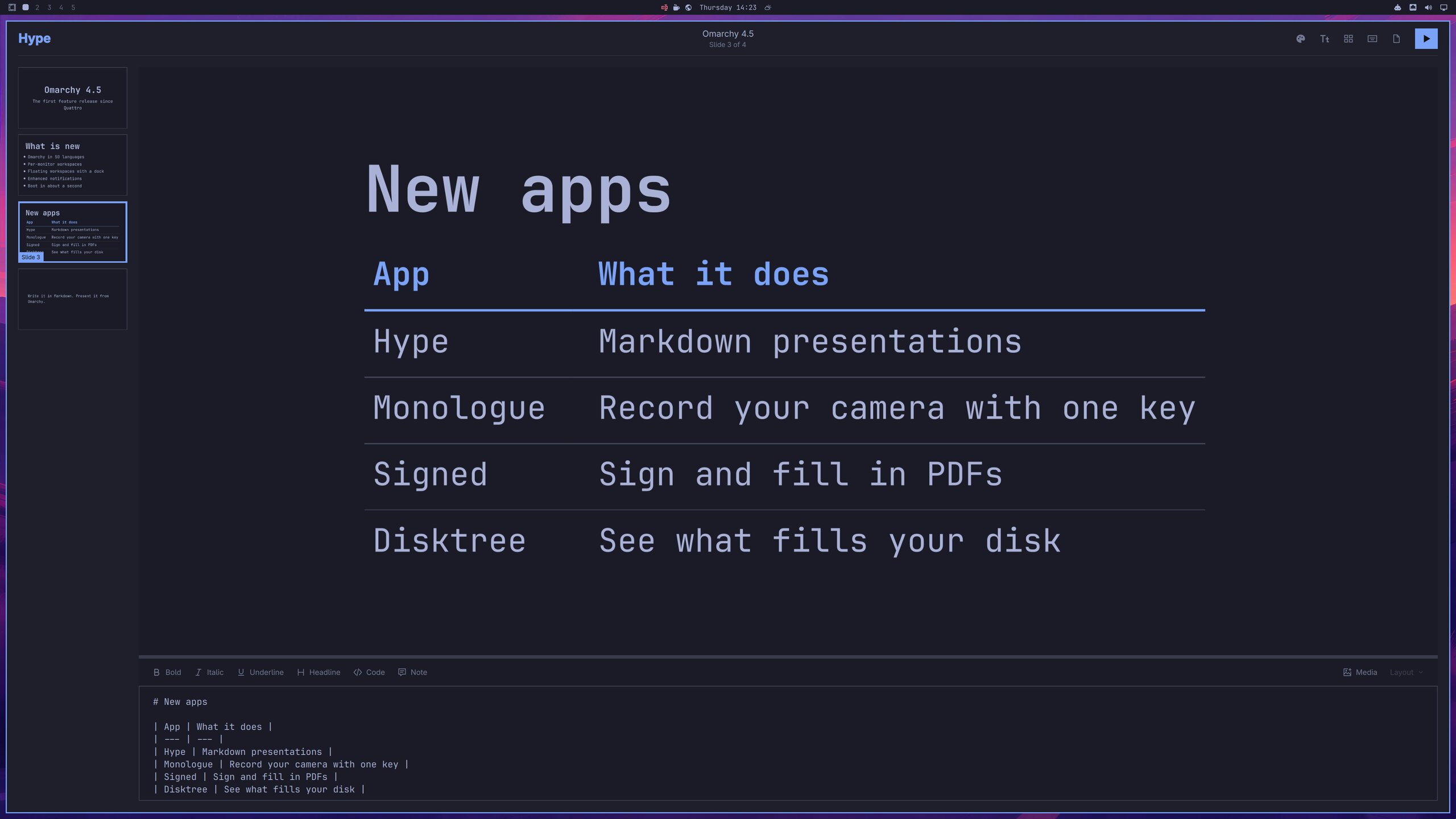
Hype makes presentations out of a single Markdown file, with a visual slide editor beside the source, and exports to PDF or PowerPoint.
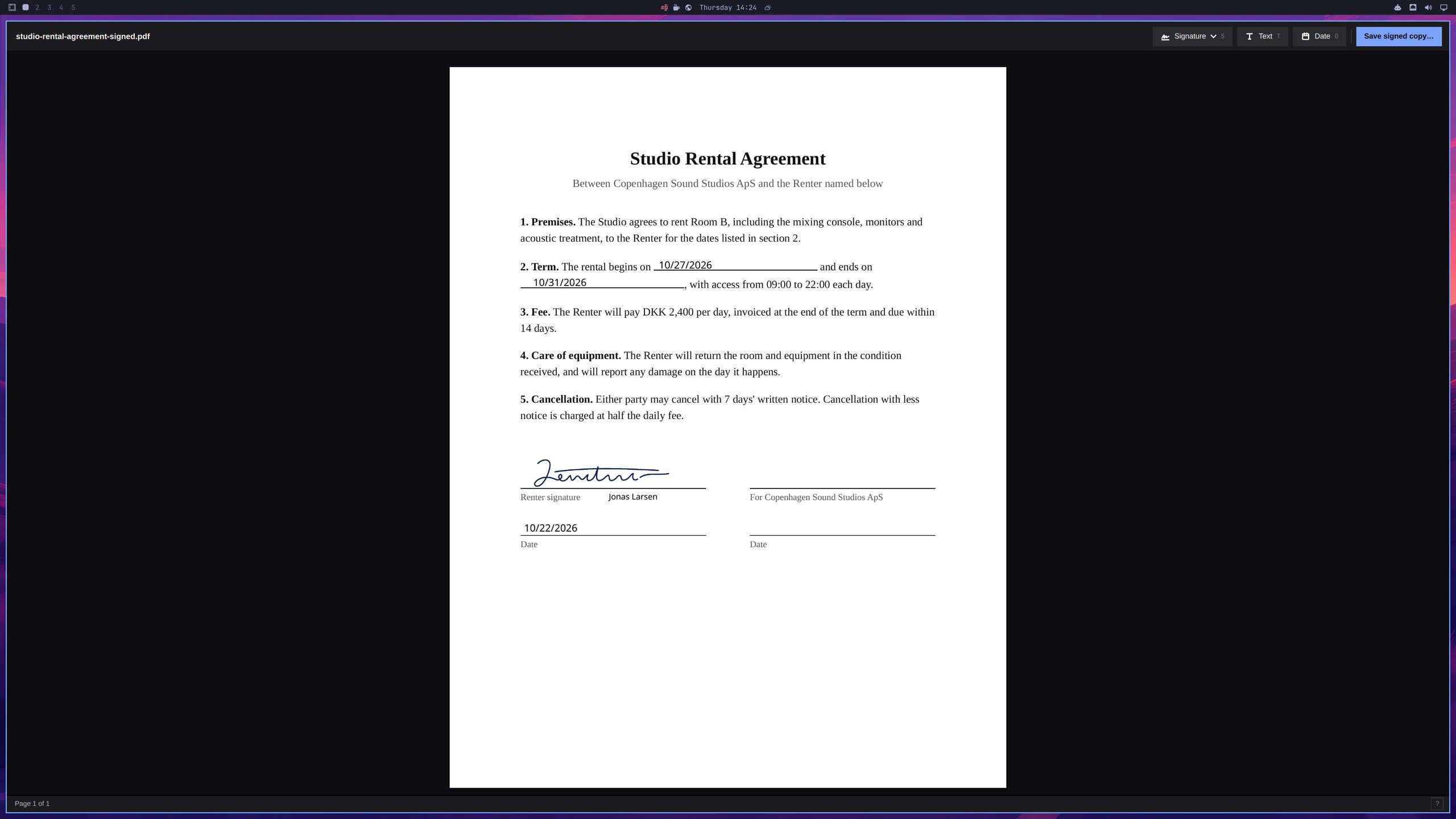
Signed replaces Xournal++ for the paperwork: open a PDF, place your saved signature, text, and dates on it, and save a signed copy.
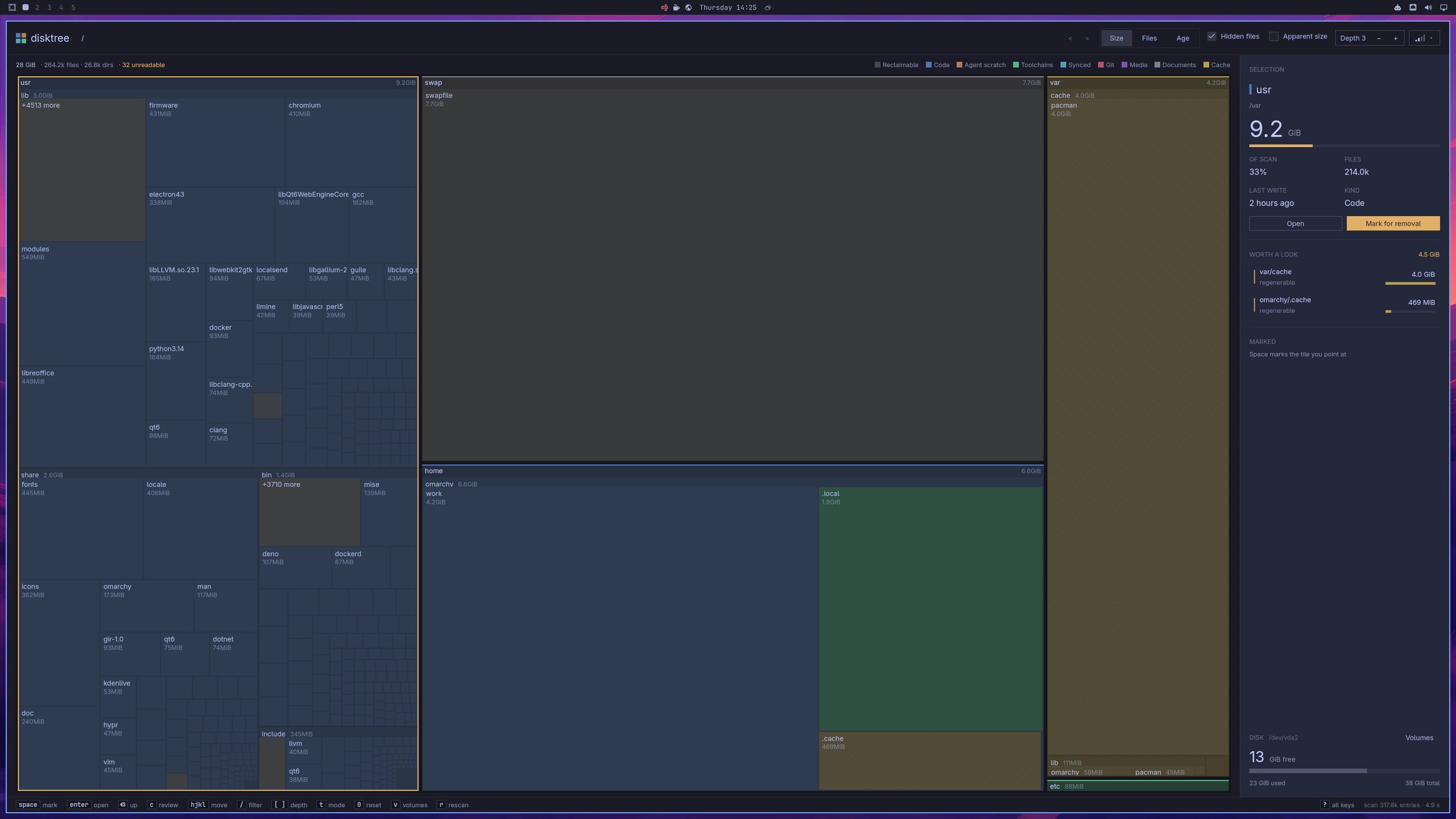
Disktree replaces the Disk Usage TUI with a treemap of what fills a disk, colored by kind, with the regenerable caches worth a look called out, so you can mark what should go and remove it.
Monologue records your camera with one key, themed to match the desktop. Omasnap takes over screenshots from Tensaku, and gliff gives you a remote desktop over SSH.
Elsewhen, a built-in world clock
Elsewhen sits next to the clock. Tap a city on the globe to set “here”, search real places, name the people in a city, flip 12/24-hour with t and °F/°C with Alt + T, and summon it with Super + Ctrl + Alt + E.
A Quake-style console for the scratchpad
Super + Grave drops a centered, dimmed terminal console over the desktop, a handy home for a terminal agent.
New hardware: NVIDIA N1x, Snapdragon X, and Apple Silicon
The ASUS ProArt P14 and Dell XPS 16 with NVIDIA N1x run Omarchy on the aarch64 Omarchy kernel and NVIDIA’s open driver.
Snapdragon X laptops such as the Lenovo Yoga Slim 7x and ThinkPad T14s run Omarchy on its own aarch64 kernel. Setup pulls the GPU and DSP firmware from Windows, picks the right device tree at boot, and gets the cameras working in the desktop and Chromium, with hardware video decoding in mpv and Chromium.
Omarchy Mac used to be a separate fork. Its shared hardware and desktop support now lives in Omarchy itself, so Apple Silicon Macs run the same Omarchy as every other machine, with only their boot setup left in the Omarchy Mac packages.
New Contributors
- @heyjohnwilson made their first contribution in https://github.com/omacom/omarchy/pull/7057
- @sanjyay made their first contribution in https://github.com/omacom/omarchy/pull/6900
- @fuchsblau made their first contribution in https://github.com/omacom/omarchy/pull/7581
- @samirpokharel made their first contribution in https://github.com/omacom/omarchy/pull/8089
- @bastidotnet made their first contribution in https://github.com/omacom/omarchy/pull/8067
- @mdisec made their first contribution in https://github.com/omacom/omarchy/pull/8172
- @orienw made their first contribution in https://github.com/omacom/omarchy/pull/7649
- @malik-na made their first contribution in https://github.com/omacom/omarchy/pull/8192
- @LukasParke made their first contribution in https://github.com/omacom/omarchy/pull/8455
- @Chessing234 made their first contribution in https://github.com/omacom/omarchy/pull/7984
- @ErikMelton made their first contribution in https://github.com/omacom/omarchy/pull/8397
- @Skeptomenos made their first contribution in https://github.com/omacom/omarchy/pull/8268
- @jmwall made their first contribution in https://github.com/omacom/omarchy/pull/8162
- @AFOliveira made their first contribution in https://github.com/omacom/omarchy/pull/8419
- @smfworks made their first contribution in https://github.com/omacom/omarchy/pull/8611
- @Adolanium made their first contribution in https://github.com/omacom/omarchy/pull/7843
- @barmstrong made their first contribution in https://github.com/omacom/omarchy/pull/9485
- @powderluv made their first contribution in https://github.com/omacom/omarchy/pull/10442
- @gardensazurescens made their first contribution in https://github.com/omacom/omarchy/pull/6792
- @steelcityappliance made their first contribution in https://github.com/omacom/omarchy/pull/10532
- @jp30566347 made their first contribution in https://github.com/omacom/omarchy/pull/9915
- @codemonkey76 made their first contribution in https://github.com/omacom/omarchy/pull/10460
- @ogarza made their first contribution in https://github.com/omacom/omarchy/pull/9140
- @antonkesy made their first contribution in https://github.com/omacom/omarchy/pull/11698
- @dicemans made their first contribution in https://github.com/omacom/omarchy/pull/7902
- @nunomaduro made their first contribution in https://github.com/omacom/omarchy/pull/12141
- @Kenny1291 made their first contribution in https://github.com/omacom/omarchy/pull/10280
- @Bartok9 made their first contribution in https://github.com/omacom/omarchy/pull/12839
- @animadito made their first contribution in https://github.com/omacom/omarchy/pull/9125
- @lalvarezt made their first contribution in https://github.com/omacom/omarchy/pull/11495
- @vjohansen made their first contribution in https://github.com/omacom/omarchy/pull/10033
- @ivanskodje made their first contribution in https://github.com/omacom/omarchy/pull/10016
- @anandude made their first contribution in https://github.com/omacom/omarchy/pull/12864
- @MicahelE made their first contribution in https://github.com/omacom/omarchy/pull/12774
- @Yarlord made their first contribution in https://github.com/omacom/omarchy/pull/11690
- @surim0n made their first contribution in https://github.com/omacom/omarchy/pull/13038
- @MGross21 made their first contribution in https://github.com/omacom/omarchy/pull/3284
- @carletex made their first contribution in https://github.com/omacom/omarchy/pull/9399
- @joewinke made their first contribution in https://github.com/omacom/omarchy/pull/11925
- @keylimesoda made their first contribution in https://github.com/omacom/omarchy/pull/14117
- @g-desoutter made their first contribution in https://github.com/omacom/omarchy/pull/6896
- @Wheel-Smith made their first contribution in https://github.com/omacom/omarchy/pull/9873
- @chemineer1 made their first contribution in https://github.com/omacom/omarchy/pull/13076
- @stefanoverna made their first contribution in https://github.com/omacom/omarchy/pull/13396
- @paulogeyer made their first contribution in https://github.com/omacom/omarchy/pull/12538
- @atoslins made their first contribution in https://github.com/omacom/omarchy/pull/12323
- @berndb made their first contribution in https://github.com/omacom/omarchy/pull/7806
- @selfcrypto made their first contribution in https://github.com/omacom/omarchy/pull/12569
- @houz42 made their first contribution in https://github.com/omacom/omarchy/pull/13725
- @silversword411 made their first contribution in https://github.com/omacom/omarchy/pull/11015
- @michaeldeby made their first contribution in https://github.com/omacom/omarchy/pull/12958
- @GeertJohan made their first contribution in https://github.com/omacom/omarchy/pull/7158
- @Raj-Jagadeesh-A-P made their first contribution in https://github.com/omacom/omarchy/pull/13233
- @maxcroy1 made their first contribution in https://github.com/omacom/omarchy/pull/9488
- @yamz8 made their first contribution in https://github.com/omacom/omarchy/pull/9639
- @mayaanhafeez made their first contribution in https://github.com/omacom/omarchy/pull/8787
- @nchudleigh made their first contribution in https://github.com/omacom/omarchy/pull/14645
- @outfoxxed made their first contribution in https://github.com/omacom/omarchy/pull/14845
- @edschofield made their first contribution in https://github.com/omacom/omarchy/pull/10783
- @kkoontz made their first contribution in https://github.com/omacom/omarchy/pull/10499
- @AnthonyPoschen made their first contribution in https://github.com/omacom/omarchy/pull/7792
- @stephenlenton made their first contribution in https://github.com/omacom/omarchy/pull/11803
- @Susensio made their first contribution in https://github.com/omacom/omarchy/pull/13895
- @tcballard made their first contribution in https://github.com/omacom/omarchy/pull/14755
- @Raiden-MeixElysia made their first contribution in https://github.com/omacom/omarchy/pull/15116
- @sorenmat made their first contribution in https://github.com/omacom/omarchy/pull/7261
- @Sebo1411 made their first contribution in https://github.com/omacom/omarchy/pull/14855
- @TripleU613 made their first contribution in https://github.com/omacom/omarchy/pull/8827
- @bprendie made their first contribution in https://github.com/omacom/omarchy/pull/15331
- @Vinx911 made their first contribution in https://github.com/omacom/omarchy/pull/15731
- @Stegi56 made their first contribution in https://github.com/omacom/omarchy/pull/15722
- @stoddart made their first contribution in https://github.com/omacom/omarchy/pull/8974
- @rip747 made their first contribution in https://github.com/omacom/omarchy/pull/8805
- @jdx made their first contribution in https://github.com/omacom/omarchy/pull/9596
- @sprajs made their first contribution in https://github.com/omacom/omarchy/pull/15210
- @kevincardwell made their first contribution in https://github.com/omacom/omarchy/pull/14885
- @imzihuailin made their first contribution in https://github.com/omacom/omarchy/pull/15141
- @wstock made their first contribution in https://github.com/omacom/omarchy/pull/15526
Full Changelog: https://github.com/omacom/omarchy/compare/v4.0.6...v4.5.0-rc1